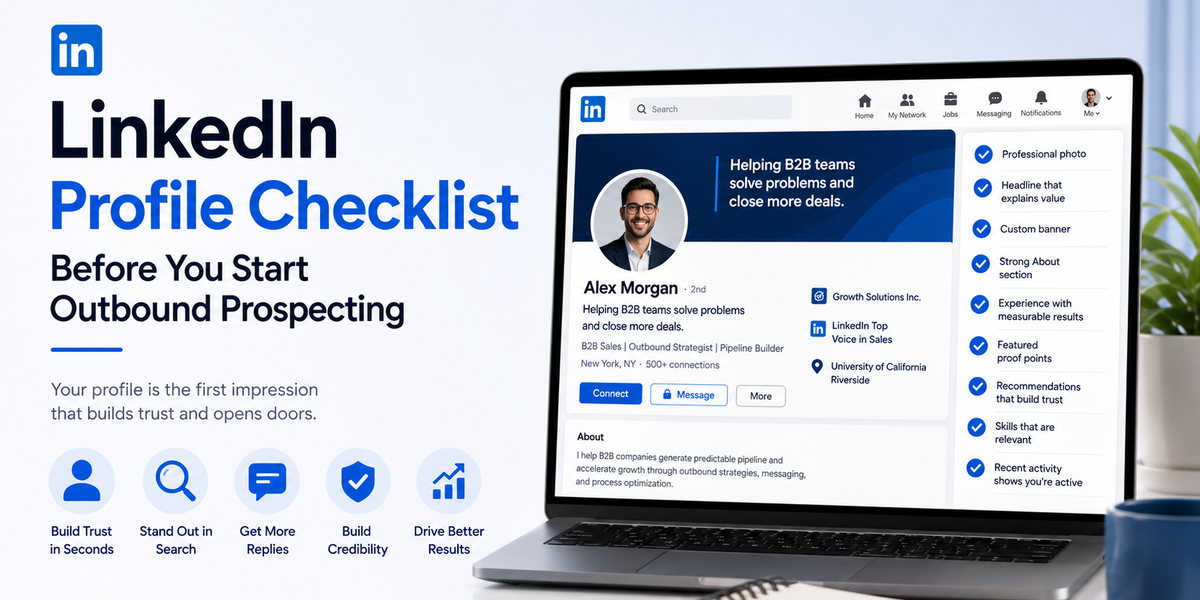
Why Your Profile Does More Work Than You Think
Picture handing someone your business card at a networking event. Chances are, before they call you back, they'll look you up. LinkedIn is that same moment, just faster and quieter — your prospect is running a mental background check on you the second your name shows up in their notifications.
A profile that looks put-together doesn't just seem nicer. It changes actual numbers: more connection requests accepted, more messages read all the way through, more replies. And a profile that looks abandoned does the opposite — it can undo good outreach before it ever gets a chance to work.
Here's what to check, one piece at a time.
Your Photo Should Look Like You'd Actually Talk to This Person
Skip the studio headshot obsession. What matters more is that your photo looks current, clear, and approachable.
A few things worth checking:
- Your face should take up most of the frame, well-lit, no group shots or sunglasses.
- Pick something recent. If a client met you in person, would they recognize you from this photo?
- Aim for "friendly colleague," not "corporate stock photo."
You're not auditioning for a magazine cover. You just need to look like someone worth replying to.
Fix Your Headline — It's Doing More Than You Realize
Most people default to their job title here, which is a missed opportunity, because the headline shows up everywhere: search results, comments, connection requests, messages. It's basically your name tag across all of LinkedIn.
Instead of listing a title, try answering one question — who do you help, and how?
So instead of: "Business Development Manager at XYZ Company"
Try something closer to: "Helping IT teams cut onboarding time in half — B2B software"
Small change, but it means every time your name shows up anywhere on the platform, it's already explaining what you do.
Don't Ignore the Banner
That big rectangle behind your profile photo usually just sits there empty, using LinkedIn's plain default. Which is a shame, because it's free space you're not using.
Put something useful there — your company name, a short tagline, maybe a line about the outcomes you help people reach. Nobody's going to remember a blank gray banner, but a clear message might stick.
Write Your About Section Like You're Talking to a Person, Not a Committee
This is where people go when they want more than the headline gives them. And this is also where a lot of good profiles fall apart, because they switch into stiff, formal language — "results-driven professional with a passion for synergy" — the kind of writing nobody actually talks like.
Try covering three things instead, in your own words:
- Who you actually help
- What problem you solve for them
- Some real result you've gotten before
Write it the way you'd explain your job to a friend over coffee, not the way you'd write a job application.
Your Experience Section Needs Outcomes, Not Just Duties
"Managed client accounts" tells a prospect nothing. It's a description of a role, not proof that you're good at it.
Try swapping duty-based lines for outcome-based ones wherever you can:
- Instead of "oversaw sales pipeline," try "closed $500K in new business within the first year"
- Instead of "managed client relationships," try "grew 40+ client accounts by an average of 25%."
Numbers do a lot of quiet convincing that adjectives can't.
Use the Featured Section — Almost Nobody Does
This section sits near the top of your profile, and it lets you pin things: a case study, a testimonial, a strong post you've written, even a short video. Most people leave it empty, which means filling it in is an easy way to stand out.
If you've got any of these lying around, put them here:
- A short client result or case study
- A LinkedIn post that performed well
- A recommendation worth highlighting
Think of it as the highlight reel someone skims in ten seconds before deciding whether you're worth a reply.
Let Other People Vouch for You
A profile that only talks about itself starts to feel like a sales pitch. Recommendations from real clients or coworkers take some of that weight off your own words, because now someone else is saying it for you.
Worth doing:
- Ask a couple of happy clients or past coworkers for a short recommendation.
- Keep your skills list current — trim what's outdated, add what actually reflects your work now.
Show Up Every Once in a While
Before accepting a connection request, plenty of people will glance at your recent activity. A feed with nothing in it — no posts, no comments, no likes — can quietly signal that the account isn't really active, even if you are.
You don't need to post every day. Just enough to look like a real, present person:
- Share something useful in your field every so often.
- Comment on posts from the kind of people you're trying to reach.
This does double duty. It keeps your profile looking alive, and it warms prospects up a little before you ever send them a message.
Quick Checklist Before You Start Reaching Out
- Photo is clear, current, and approachable
- Headline explains who you help, not just your title
- Banner says something instead of sitting blank
- About section sounds like a person wrote it
- Experience section shows results, not just duties
- Featured section has at least one proof point
- A few recent recommendations are visible
- Skills list actually reflects what you do now
- Recent activity shows you're an active, real presence
If most of these are checked off, your profile is ready to back up your outreach instead of quietly working against it.
Where This Leaves You
Your outreach message only does half the job. The other half happens the second a prospect clicks your name — and that part is entirely up to your profile. Fixing these basics doesn't take long, but it changes how every message you send lands afterward. You stop asking a stranger to trust a blank page, and start giving them an actual reason to reply.